Reflection of Online Design

These last 5 weeks have been really fun designing an online course.  I decided to take my psychology class that was once a face-2-face class.  This class needed to be develop for an online platform.  Developing a class for an online platform has its challenges.  One of the biggest challenges for me was creating instructions that would be clear for students.  I needed to create instructions and assignments that make it easy for students to understand what the expectations are.  Looking at the finished product I needed to take a step back and assess my creation.

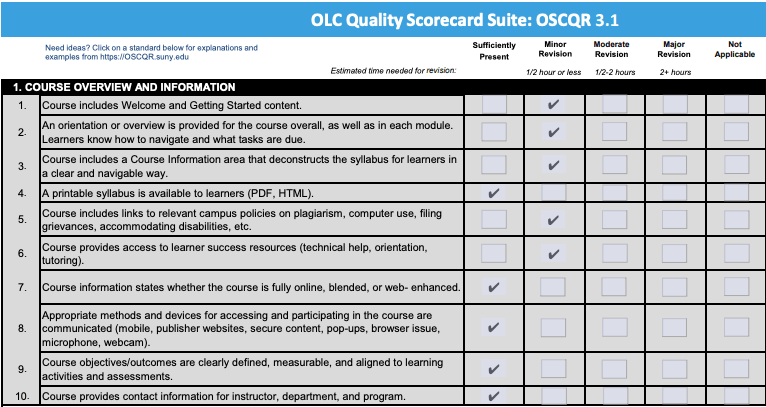
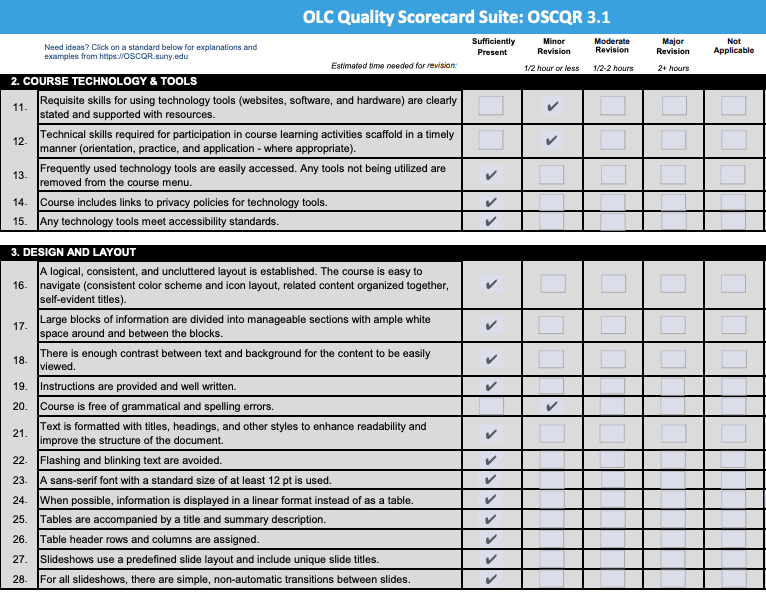
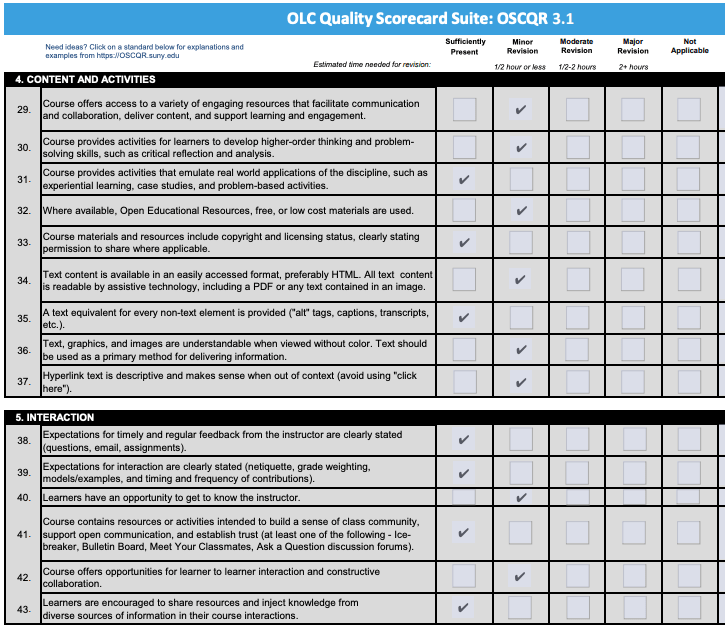
Online Course Scorecard
Screen Shot 2020-02-22 at 7.01.55 PMScreen Shot 2020-02-22 at 7.00.53 PMScreen Shot 2020-02-22 at 7.01.08 PMScreen Shot 2020-02-22 at 7.01.45 PM

  2 Areas of Focus

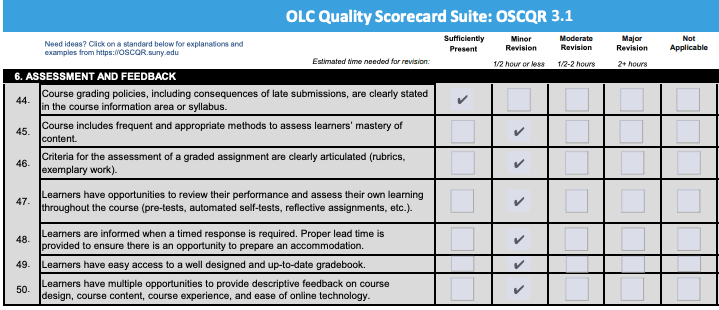
After looking at my online scorecard I see myself making some changes or improvements to my online class.  The first area of focus for me will be to look at my assessments and feedback. I feel that many of my assessments are clear and do a great job of actually assessing student’s learning.  Where I would like to clean up my assessments is in how I assess them.  I need to create rubrics for many of the assessments.  Some of the assessments have rubrics, but not all of them.  Along with assessments is feedback.  I would like to make it clearer as to when they will be given feedback and how it will be delivered.

The second area that I would like to develop further is my course overview and welcome.  I think that my overall outline did a great job of outlining the class but further details are needed in other areas. I feel that I need to do a better job of creating relationships between myself and my students.  I would like to create some videos for my students that are personalized from me.  These videos would provide information about me and how the course will be ran.  I would also like to create more opportunities for students to work with me individually.

Further Reflection

Creating an online classroom is interesting.  I needed to ask my self “How I wanted to teach?”  Along with that I need to ask myself “How I want student to learn and show their own learning.”  In doing this I took a Constructivist approach.  As I look at my online class I was pleased on how I created opportunities for students to develop their own learning.  I tried to give the students freedom to choose.  Students were given opportunities to showcase their own learning in a number of ways.  I tried to incorporate the COVA model that has been so paramount through out each of my own learning experiences.  As the teacher I tried to provide resources and questions for students to build upon.

Each of my learning opportunities were carefully planned through my 3 column outline.  Using the 3 column outline helped me lay the foundation for my online class.  This helped me create activities and learning opportunities that followed my overall outline. By using the 3 column outline students can have an understanding of what is expected of them.

The Future of Online Learning

Is the future of learning online?  Looking at the opportunities that students can be given through online learning.  It’s hard to say why not.  As I look at my small district I think that it is important for teachers to be able to develop their own online learning areas.  It is important that teachers learn how to create effect learning environments online.  This is something that I see myself doing in my job as an instructional coach.  As an instructional coach I am asked for help in many different ways.  I think that it is important to keep learning student centered.  Just like in your classroom if you can keep the students at the center everything else will follow.

It is hard to replace good teaching in the classroom.  I see online learning being primarily for high school and college students.  I can see a blended of online and face-2-face teaching being done at the lower levels but see it being difficult to have just online learning.

For my own future I am excited to create more online learning opportunities for my students.  I have been having several conversations with my building curriculum director and principal about creating future online classrooms.  This would open up more opportunities for students to learn.

Creating Your Online Classroom Part 3

Online Classroom

In the final week of creating my own online classroom.  I have started to find my own design for creating my online classroom.  Being organized is the key to creating an affective online classroom.

In this weeks thinking process I thought about how I can keep the classroom organized.  Along with that I try to keep COVA in mind.  In many of my assignments I try to provide students with many opportunities for free will/choice. Students are given the choice to decide how they want to present their learning.  This gives them ownership of their own learning.  This is a great way to meet the demands of teaching an Online classroom using Universal Design of Learning.  This is a great way for students to drive their own learning.

I am excited to see how this psychology class works.  Thinking about my current classrooms, I would like to try and create a couple more classes.  I can see my self creating another class to build upon the psychology.  I teach a second edition of psychology.  I think a class that would be interesting to creating would be an online geography class.  This interest me because there are vast amounts of online resources available.  Another reason I would like to create this class is because it could be developed to really build a COVA style class.  Students would develop their own learning with in the resources available.

If you would like to see the finished product of my online classroom take a look. https://app.schoology.com/course/2347775099/materials class code: CWTP-CC49-Z3KN3

Creating Your Online Class Part 2

Online Classroom

In part two of creating my online class, I focused on the overall design.  This week I had to answer how I would input assignments and materials?  What would this look like?  What is going to be easiest for my students?

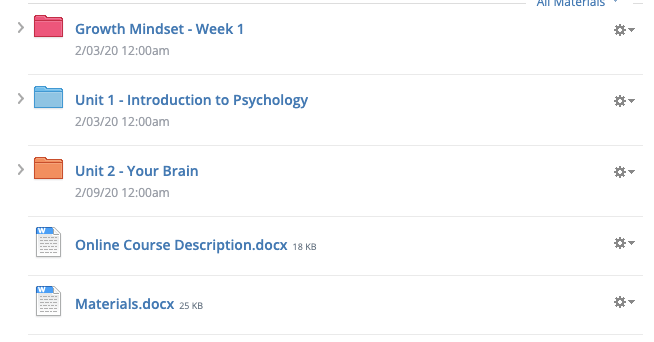
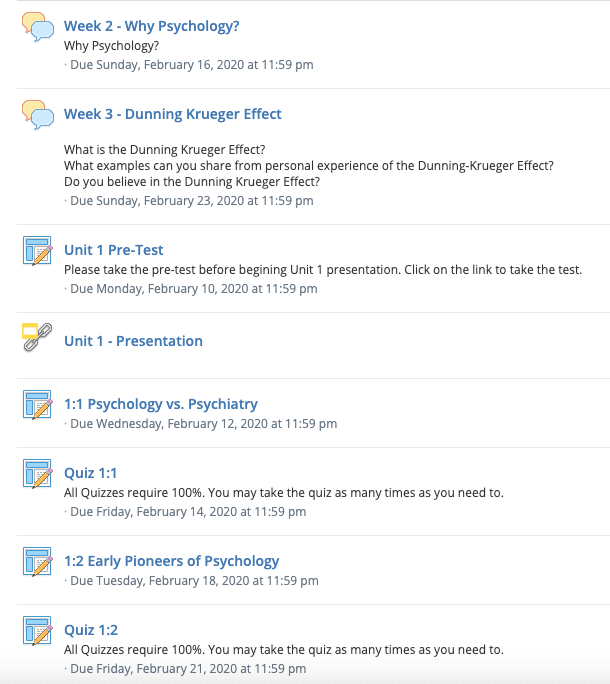
At first I started to just put all my assignments and materials in.  As I started to do this, I felt as though the main page would get messy.  So I decided to create folders for each Unit.  Here is a look of what my main page looks like.

Screen Shot 2020-02-09 at 7.27.28 PM

To me this seems well organized and easy to navigate for students.  Which is what I wanted. When you click on the folder it then opens up to a detailed outline of requirements.  Here is what a Unit folder looks like.

Screen Shot 2020-02-09 at 7.28.42 PM

This week I posted 50% of the class materials. Next week I will be posting the last 50%.  I will also be finalizing my online class.  The finishing touches will all be in place.  If you would like to see my progress you may connect my joining my class.

https://app.schoology.com/course/2347775099/materials

Code: CWTP-CC49-Z3KN3

Creating Your Online Class Part 1

Online Classroom

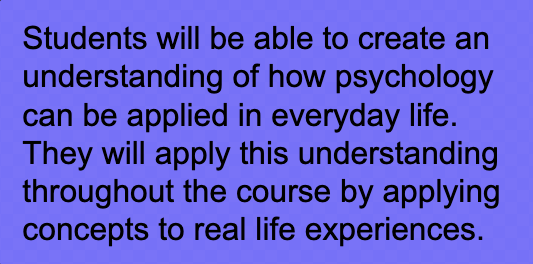
Creating an online classroom has some different challenges from teaching in a face-to-face classroom.  As the teacher in the face-to-face classroom you have more opportunities to communicate and explain your thoughts and ideas.  When looking at creating an online classroom you lose that part.  So you need to make sure that you communicate and explain what you are looking for very clearly.  Much of this week has been spent looking at what will be assessed and how will it be assessed.  When thinking about what I want my students to do, I look back at my over all goal for my students.  What is it that I want them to be able to do?

Screen Shot 2020-02-02 at 10.28.16 AM

In my online classroom I am looking for students to make real life connections.  How many time have students asked “why are we learning this.”  I want students to make those connections and see the why through their own real life experiences.

For this weeks assignment I was tasked with creating an outline of materials.  Again if you would like to follow my experience of creating an online classroom you can follow here https://app.schoology.com/course/2347775099/materials. Class code CWTP-CC49-Z3KN3.

Design a site like this with WordPress.com
Get started